一、 问题背景
在最近的一次测试(实则几年前)中,我发现了一个有趣的现象,并用 Burp Suite 进行验证时产生了新的疑问:
- 浏览器的“隐形”行为:当我使用浏览器访问带有
# 的 URL 时,查看网络请求包(Network tab),发现浏览器发送给服务器的请求路径中,默认去掉了 # 及其后面的所有内容。
- Burp 的“强制”行为:为了验证服务器对
# 的处理,我使用 Burp Suite 拦截数据包,手动在 Request Line 的 URL 路径中添加了 # 号(例如 GET /api/test#123)。
- 服务器的异常响应:结果出乎意料,服务端直接返回了 400 Bad Request
这就引出了笔者一些疑问:
- 浏览器自动丢弃
# 是一种“行业约定”还是“硬性标准”?
- 为什么手动发送
# 会导致服务器报错?
- 这种“客户端独享”的机制,有哪些用途?
二、 核心原理
1. 浏览器的“自我修养”:RFC 标准的硬性规定
浏览器之所以不发送 #,并非偶然,而是严格遵循了 URI 标准(RFC 3986)。
- 定义:在 URI 标准中,
# 后面的内容被称为 片段标识符(Fragment Identifier)。
- 作用:它的设计初衷是用于客户端内部定位。例如,
index.html#section2 告诉浏览器:“请求下载 index.html,下载完渲染时,请自动滚动到 ID 为 section2 的位置”。
- 机制:根据 HTTP 协议,片段标识符只在客户端(浏览器)起作用,与服务器无关。
结论:当你在地址栏输入 http://example.com/page#123 时,浏览器在构建 HTTP 请求报文的瞬间,就会自动截断 # 及其后的内容。发出的实际请求仅仅是:
1
2
|
GET /page HTTP/1.1
Host: example.com
|
服务器根本不知道你想要看页面的哪个片段,它只负责把整个页面发给你,剩下的定位工作由浏览器自己完成。
2. 为什么 Burp 手动发送 # 可能会导致 400/500 报错?
当我们在 Burp Suite 中绕过浏览器的过滤机制,强制发送如下报文:
1
|
GET /api/user#123 HTTP/1.1
|
这时候,我们破坏了 HTTP 协议的默契,给服务器出了一个难题。
A. Nginx/Apache 等 Web 服务器视角(400 Bad Request)
大多数 Web 服务器在接收请求时,会严格解析请求行(Request Line)。在 URL 路径(Path)中,# 属于保留字符。如果不进行 URL 编码(转义为 %23),直接出现在路径里通常被视为语法错误。
- Nginx 可能会认为请求的 URI 格式不合法。
- 或者它试图寻找一个文件名真的叫
user#123 的文件,但这通常不符合文件系统或路由映射规则。
B. 后端框架视角(500 Internal Server Error)
如果请求侥幸通过了 Nginx 转发到了后端的 Flask、Django 或 Spring Boot,问题可能会更严重:
- 路由匹配失败:后端路由通常定义为
/api/user,当接收到 /api/user#123 时,正则匹配失败,抛出异常。
- 解析崩溃:某些框架在解析 URL 参数时,遇到未转义的特殊字符可能会触发代码层面的 Unhandled Exception,从而直接导致 500 错误。
PS:如果你真的想把 # 字符作为参数值发送给服务器(例如作为搜索关键字),必须对其进行 URL 编码,即发送 %23。
但是实操下来,简单的Demo并不能复现400/500状态码
1
2
|
nginx version: nginx/1.24.0 (Ubuntu)
Flask version: 3.0.2
|
flask.py
 1
 2
 3
 4
 5
 6
 7
 8
 9
10
11
12
13
14
|
from flask import Flask, request

app = Flask(__name__)

@app.route('/', defaults={'path': ''})
@app.route('/<path:path>')
def catch_all(path):
    # 获取请求信息
    request_uri = request.environ.get('REQUEST_URI', '')
    raw_path = request.environ.get('RAW_URI', '')
    return f'Path: {path}, REQUEST_URI: {request_uri}, RAW_URI: {raw_path}, Method: {request.method}', 200

if __name__ == '__main__':
    app.run(host='0.0.0.0', port=6001)
|
direct request flask
1
2
|
GET /123# HTTP/1.1
Host: localhost:6001
|
1
2
3
4
5
6
7
8
|
HTTP/1.1 200 OK
Server: Werkzeug/3.0.1 Python/3.12.3
Date: Thu, 25 Dec 2025 05:55:42 GMT
Content-Type: text/html; charset=utf-8
Connection: close
Content-Length: 58

Path: 123, REQUEST_URI: /123#, RAW_URI: /123#, Method: GET
|
request flask behind nginx
1
2
|
GET /123# HTTP/1.1
Host: localhost:6000
|
1
2
3
4
5
6
7
8
|
HTTP/1.1 200 OK
Server: nginx/1.24.0 (Ubuntu)
Date: Thu, 25 Dec 2025 05:59:30 GMT
Content-Type: text/html; charset=utf-8
Connection: keep-alive
Content-Length: 58

Path: 123, REQUEST_URI: /123#, RAW_URI: /123#, Method: GET
|
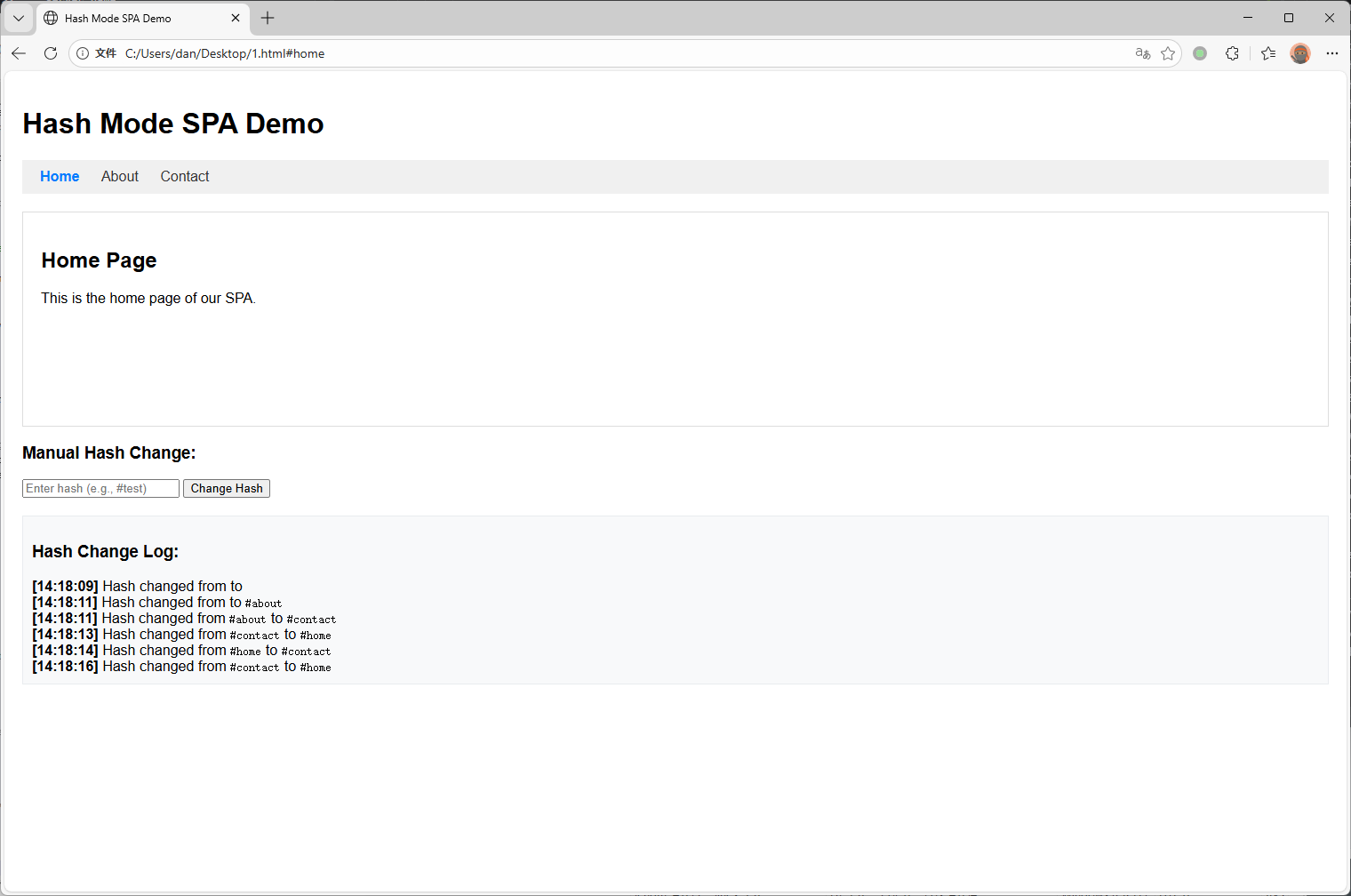
3. 前端路由的基石:Hash 模式
正是因为 “改变 URL 中的 # 部分不会触发 HTTP 请求” 这一特性,才诞生了现代单页应用(SPA)中最经典的前端路由模式——Hash 模式。
在 Vue Router 或 React Router 的 Hash 模式下:
- 改变 URL:用户点击链接,URL 从
/home 变为 /home#user。
- 拦截请求:由于
# 的特性,浏览器不会向服务器发送请求,页面不会刷新(白屏)。
- 捕获变化:浏览器提供了
window.onhashchange 事件,前端框架监听这个事件。
- 动态渲染:监听到 hash 变化后,JS 根据
# 后的内容(如 user),动态将页面中的组件替换为“用户页组件”。
AI补充
1
2
3
4
|
对比 History 模式

另一种流行的 **History 模式**(利用 HTML5 `pushState` API)虽然去掉了 `#`,让 URL 看起来更美观(如 `/home/user`),但它失去“天然不请求服务器”的屏障。
因此,History 模式必须要求服务端(Nginx)进行配合:配置 fallback 规则,将所有找不到资源的请求都重定向回 `index.html`,否则用户手动刷新页面时,服务器会真的去请求 `/home/user` 这个文件,导致 404 错误。
|
SPA Hash 模式的HTML示例
  1
  2
  3
  4
  5
  6
  7
  8
  9
 10
 11
 12
 13
 14
 15
 16
 17
 18
 19
 20
 21
 22
 23
 24
 25
 26
 27
 28
 29
 30
 31
 32
 33
 34
 35
 36
 37
 38
 39
 40
 41
 42
 43
 44
 45
 46
 47
 48
 49
 50
 51
 52
 53
 54
 55
 56
 57
 58
 59
 60
 61
 62
 63
 64
 65
 66
 67
 68
 69
 70
 71
 72
 73
 74
 75
 76
 77
 78
 79
 80
 81
 82
 83
 84
 85
 86
 87
 88
 89
 90
 91
 92
 93
 94
 95
 96
 97
 98
 99
100
101
102
103
104
105
106
107
108
109
110
111
112
113
114
115
116
117
118
119
120
121
122
123
124
125
126
127
128
129
130
131
132
133
134
135
136
137
138
139
140
141
142
143
144
145
146
147
148
149
150
151
152
153
154
155
156
157
|
<!DOCTYPE html>
<html lang="en">
<head>
    <meta charset="UTF-8">
    <meta name="viewport" content="width=device-width, initial-scale=1.0">
    <title>Hash Mode SPA Demo</title>
    <style>
        body {
            font-family: Arial, sans-serif;
            margin: 0;
            padding: 20px;
        }
        nav {
            background: #f0f0f0;
            padding: 10px;
            margin-bottom: 20px;
        }
        nav a {
            margin: 0 10px;
            text-decoration: none;
            color: #333;
        }
        nav a.active {
            font-weight: bold;
            color: #007bff;
        }
        #content {
            padding: 20px;
            border: 1px solid #ddd;
            min-height: 200px;
        }
        .page {
            display: none;
        }
        .page.active {
            display: block;
        }
        #log {
            margin-top: 20px;
            padding: 10px;
            background: #f8f9fa;
            border: 1px solid #e9ecef;
            max-height: 200px;
            overflow-y: auto;
        }
    </style>
</head>
<body>
    <h1>Hash Mode SPA Demo</h1>

    <nav>
        <a href="#home">Home</a>
        <a href="#about">About</a>
        <a href="#contact">Contact</a>
    </nav>

    <div id="content">
        <div id="home" class="page active">
            <h2>Home Page</h2>
            <p>This is the home page of our SPA.</p>
        </div>
        <div id="about" class="page">
            <h2>About Page</h2>
            <p>This is the about page.</p>
        </div>
        <div id="contact" class="page">
            <h2>Contact Page</h2>
            <p>This is the contact page.</p>
        </div>
    </div>

    <div>
        <h3>Manual Hash Change:</h3>
        <input type="text" id="hashInput" placeholder="Enter hash (e.g., #test)">
        <button onclick="changeHash()">Change Hash</button>
    </div>

    <div id="log">
        <h3>Hash Change Log:</h3>
    </div>

    <script>
        // Function to update active page based on hash
        function updatePage() {
            const hash = window.location.hash || '#home';
            const pageId = hash.substring(1);

            // Update active page
            document.querySelectorAll('.page').forEach(page => {
                page.classList.remove('active');
            });
            document.getElementById(pageId).classList.add('active');

            // Update active nav link
            document.querySelectorAll('nav a').forEach(link => {
                link.classList.remove('active');
                if (link.getAttribute('href') === hash) {
                    link.classList.add('active');
                }
            });
        }

        // Function to log hash changes
        function logHashChange(oldHash, newHash) {
            const logDiv = document.getElementById('log');
            const timestamp = new Date().toLocaleTimeString();
            const logEntry = document.createElement('div');
            logEntry.innerHTML = `<strong>[${timestamp}]</strong> Hash changed from <code>${oldHash}</code> to <code>${newHash}</code>`;
            logDiv.appendChild(logEntry);
            logDiv.scrollTop = logDiv.scrollHeight;

            // Also log to console
            console.log(`Hash changed: ${oldHash} -> ${newHash}`);
        }

        // Function to manually change hash
        function changeHash() {
            const input = document.getElementById('hashInput');
            const newHash = input.value;
            if (newHash) {
                window.location.hash = newHash;
            }
        }

        // Track previous hash
        let previousHash = window.location.hash;

        // Listen for hashchange event
        window.addEventListener('hashchange', (event) => {
            const newHash = window.location.hash;
            logHashChange(previousHash, newHash);
            previousHash = newHash;
            updatePage();
        });

        // Initialize
        updatePage();
        logHashChange('', previousHash);

        // Test programmatic hash change
        setTimeout(() => {
            console.log('Programmatically changing hash to #about');
            window.location.hash = '#about';
        }, 2000);

        setTimeout(() => {
            console.log('Programmatically changing hash to #contact');
            window.location.hash = '#contact';
        }, 4000);

        setTimeout(() => {
            console.log('Programmatically changing hash to #home');
            window.location.hash = '#home';
        }, 6000);
    </script>
</body>
</html>
|
这里使用了window.addEventListener('hashchange', (event) => {来代替 window.onhashchange ,是一种更推荐的用法
三、 After All
回顾最初的现象,得出了完整的逻辑链条:
- 约定(Convention):HTTP 协议规定
# 是客户端片段标识符,浏览器永远不发送给服务器。
- 异常(Exception):在 Burp 中强制发送未编码的
#,破坏了 URL 语法或服务端解析规则,因此导致 400/500 错误。
- 应用(Application):前端工程师巧妙利用了“浏览器不发送 # 且不刷新页面”的特性,构建了Hash 路由,成为了单页应用架构的核心基石之一。
是否会出现错误,依赖于中间件以及后端框架的错误处理或者鲁棒性。但是还是学到了window.onhashchange啊喂